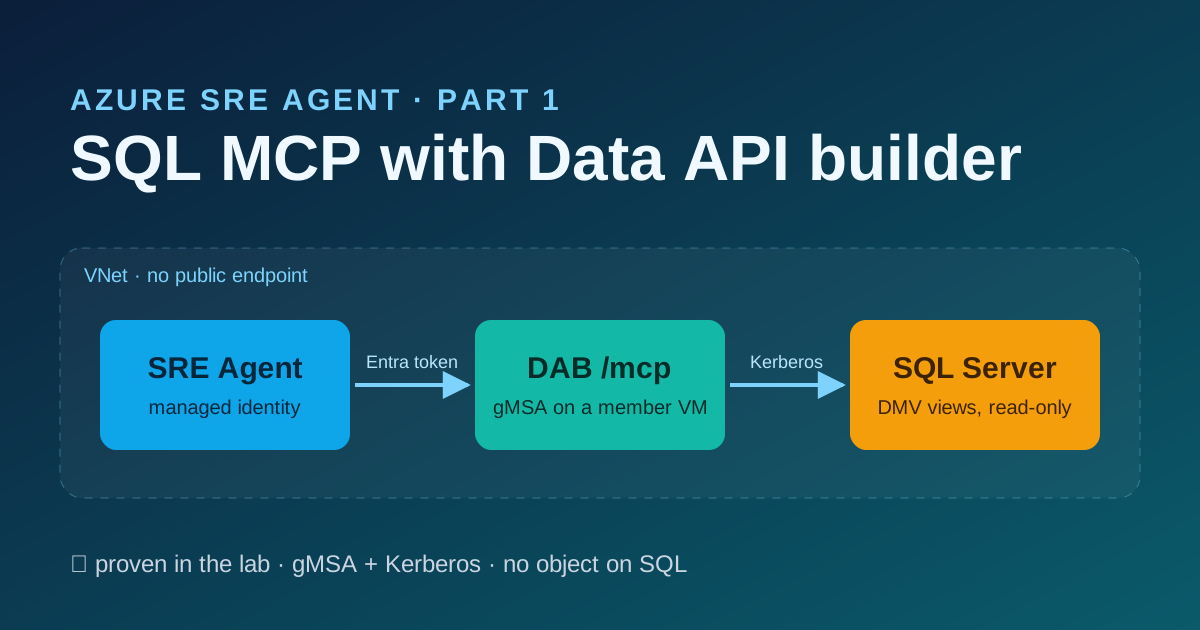

We wanted Azure SRE Agent to answer “what is the top wait on sql02?” and “how many user sessions are there right now?”
without ever handing it a SQL prompt. No sysadmin, no free-form query, no helper database on the SQL Servers, and no
public endpoint. This post is how we built that with Data API builder (DAB) 2.1.5 and its MCP endpoint, and what
broke along the way.
✅ = proven in our lab · 📄 = documented only (Microsoft Learn or DAB source code), not tested by us.
Goal and audience#
Goal. At the end, the agent reads seven SQL Server DMV views (waits, counters, memory, sessions, requests, query stats) on every server you list, through an MCP connector that authenticates with the agent’s own managed identity and travels over your VNet. SQL Server sees a single low-privilege gMSA over Kerberos. Nothing is created on SQL beyond a login.
Audience. Azure and SQL Server engineers who run SRE Agent, or are about to, and want it to see database health.
You should be comfortable with Active Directory (gMSA), T-SQL logins, Entra app registrations and az rest.
How it fits together#
DAB is Microsoft’s open-source engine that serves database objects listed in a JSON config as an API. We use only its
MCP endpoint (/mcp, Streamable HTTP); REST and GraphQL are off. DAB has no SQL of its own: every tool call becomes a
SELECT on a view you configured. ✅
flowchart LR
  subgraph AZ["Azure VNet (no public endpoint)"]
    AG["Azure SRE Agent
system-assigned MI"]
    subgraph HOST["mcp01 (domain member)"]
      DAB["DAB 2.1.5 /mcp
scheduled task as gMSA"]
    end
  end
  ENTRA["Entra ID
app sql-mcp-api, role MCP.Read"]
  SQL1[("sql01
DMV views")]
  SQL2[("sql02
DMV views")]
  AG -- "1 token for api://appId" --> ENTRA
  AG -- "2 HTTP :5000 + Bearer + X-MS-API-ROLE" --> DAB
  DAB -- "3 signing keys, outbound 443" --> ENTRA
  DAB -- "4 TDS 1433, Kerberos as gmsa-dab$" --> SQL1
  DAB -- "4" --> SQL2
- The agent asks Entra for a token for
api://<appId>with its managed identity. Only identities holding the app roleMCP.Readget one: the app requires assignment. ✅ - The connector calls
http://mcp01.contoso.local:5000/mcpover the VNet, with the token and the headerX-MS-API-ROLE: MCP.Read. ✅ - DAB checks
aud,issand the signature (keys fetched from Entra over outbound 443) and the role. ✅ - DAB connects to SQL Server as the gMSA over Kerberos. It does not pass the caller on. ✅
What the agent gets is three read-only tools: describe_entities (what exists, with column descriptions),
read_records (filter, order, select, first) and aggregate_records (count, sum, avg, min, max, group by). There is
no “run a query” tool. ✅
Prerequisites#
| Area | Requirement | |
|---|---|---|
| SRE Agent | Egress mode Azure VNet, private DNS resolution on | ✅ |
| Remote MCP server access = off (keeps MCP traffic in your VNet) | ✅ | |
| System-assigned managed identity (a user-assigned one also works) | ✅ / 📄 | |
| Active Directory | A domain with a KDS root key; Domain Admin for the gMSA | ✅ |
| MCP host | Windows Server domain member, no public IP. Outbound TCP 443 to Entra for token signing keys. No inbound internet | ✅ |
| SQL Server | 2022 or later for ##MS_ServerPerformanceStateReader## (we ran 2025). 2016–2019 need VIEW SERVER STATE | ✅ 2025 / 📄 older |
| Network | Agent subnet → MCP host TCP 5000; the host name resolves from the agent subnet | ✅ |
| Entra | Someone who can create an app registration and assign an app role | ✅ |
| Admin machine | Azure CLI, signed in. zsh or PowerShell | ✅ zsh / 📄 PowerShell |
HTTPS is not required: the connector accepts http:// inside the VNet. ✅ On-premises SQL Servers work the same way
over VPN or ExpressRoute, as long as the agent subnet can reach the host. 📄
Steps#
Commands for the admin machine come in two tabs. Pick your shell once; every block on the page follows. Commands that run on a Windows server or in SQL appear once.
1. Create the gMSA (on a domain controller)#
# KDS root key: once per forest. Production: -EffectiveImmediately, then wait 10 h.
if (-not (Get-KdsRootKey)) { Add-KdsRootKey -EffectiveImmediately }
New-ADServiceAccount -Name gmsa-dab -DNSHostName gmsa-dab.contoso.local `
  -PrincipalsAllowedToRetrieveManagedPassword 'mcp01$'
2. Give the gMSA one login and one role (on each SQL Server, as sysadmin)#
CREATE LOGIN [CONTOSO\gmsa-dab$] FROM WINDOWS WITH DEFAULT_DATABASE = [master];
ALTER SERVER ROLE [##MS_ServerPerformanceStateReader##] ADD MEMBER [CONTOSO\gmsa-dab$];
SELECT IS_SRVROLEMEMBER('sysadmin', N'CONTOSO\gmsa-dab$') AS is_sysadmin;   -- expect 0
##MS_ServerPerformanceStateReader## is VIEW SERVER PERFORMANCE STATE: performance DMVs, nothing else. No table
data, no security DMVs, no way to change anything. No database user is created. ✅
On 2016–2019 use GRANT VIEW SERVER STATE instead. It is broader (it includes security-related state and other
sessions’ query text). 📄
sys.dm_exec_sessions and sys.dm_exec_requests then return
only DAB’s own session. The counts look valid and are wrong. Check sys.server_permissions, not just “it returns
rows”. 📄 (Learn; we only ran 2025)3. Install DAB on the MCP host (as local admin)#
Install-WindowsFeature RSAT-AD-PowerShell
Install-ADServiceAccount gmsa-dab
Test-ADServiceAccount gmsa-dab                       # True
Then, on the same host:
- Grant the gMSA Log on as a batch job (a scheduled task needs it).
- Unpack the self-contained
dab_net10.0_win-x64-2.1.5.zipfrom the DAB GitHub release intoC:\dab\bin. No .NET install is needed.C:\dab\bin\Microsoft.DataApiBuilder.exe --versionprints2.1.5. Pin the version: 2.1.5 introducedallowed-hosts. - Create
C:\dab\config(gMSA: read) andC:\dab\logs(gMSA: modify). - Register the scheduled task that is the service (DAB is not a Windows service):
$cmd = '/c set ASPNETCORE_URLS=http://0.0.0.0:5000&& C:\dab\bin\Microsoft.DataApiBuilder.exe start --config dab-config.json > C:\dab\logs\dab.log 2>&1'
$a = New-ScheduledTaskAction -Execute cmd.exe -Argument $cmd -WorkingDirectory C:\dab\config
$t = New-ScheduledTaskTrigger -AtStartup
$p = New-ScheduledTaskPrincipal -UserId 'CONTOSO\gmsa-dab$' -LogonType Password   # no password for a gMSA
$s = New-ScheduledTaskSettingsSet -ExecutionTimeLimit ([TimeSpan]::Zero) -RestartCount 3 -RestartInterval (New-TimeSpan -Minutes 1)
Register-ScheduledTask -TaskName 'DAB-MCP' -Action $a -Trigger $t -Principal $p -Settings $s -Force- Open TCP 5000 only to the agent and VM subnets. Windows Firewall stays on:
New-NetFirewallRule -Name dab-mcp-5000 -DisplayName 'DAB MCP 5000 (VNet only)' -Direction Inbound `
  -Protocol TCP -LocalPort 5000 -RemoteAddress <agent-subnet>,<vm-subnet> -Action Allow -Profile Any
4. Write the DAB configuration#
The layout matters more than it looks; the findings explain why.
dab-config.json, the root: the runtime, a list of per-server files, and a placeholder data source.- One file per SQL Server (
sql01.json,sql02.json): its connection string and its entities. - One entity = one DMV view on one server, named
<server>_<view>:sql01_wait_stats,sql02_sessions.
The root (C:\dab\config\dab-config.json):
{
  "data-source": {
    "database-type": "mssql",
    "connection-string": "Server=dab-placeholder.invalid;Database=master;Integrated Security=True;Encrypt=True;TrustServerCertificate=True",
    "health": { "enabled": false, "name": "placeholder" }
  },
  "data-source-files": [ "sql01.json", "sql02.json" ],
  "entities": {},
  "runtime": {
    "rest": { "enabled": false },
    "graphql": { "enabled": false },
    "mcp": {
      "enabled": true, "path": "/mcp",
      "allowed-hosts": [ "mcp01", "mcp01.contoso.local" ],
      "dml-tools": { "describe-entities": true, "read-records": true, "aggregate-records": true,
                     "create-record": false, "update-record": false, "delete-record": false, "execute-entity": false }
    },
    "host": {
      "mode": "production",
      "authentication": {
        "provider": "EntraId",
        "jwt": { "audience": "<appId>", "issuer": "https://login.microsoftonline.com/<tenant-id>/v2.0" }
      }
    },
    "cache": { "enabled": false }
  }
}
One server file (sql01.json), shortened to one entity and three of its columns:
{
  "data-source": {
    "database-type": "mssql",
    "connection-string": "Server=sql01.contoso.local;Database=master;Integrated Security=True;Encrypt=True;TrustServerCertificate=True;Application Name=dab-mcp",
    "health": { "name": "sql01" }
  },
  "entities": {
    "sql01_wait_stats": {
      "description": "sql01: sys.dm_os_wait_stats",
      "source": { "object": "sys.dm_os_wait_stats", "type": "view" },
      "fields": [
        { "name": "wait_type", "primary-key": true },
        { "name": "wait_time_ms", "description": "Total wait time for this wait type in ms, including signal_wait_time_ms." },
        { "name": "signal_wait_time_ms", "description": "Part of wait_time_ms spent waiting for CPU after the resource was ready (CPU pressure)." }
      ],
      "graphql": { "enabled": false },
      "cache": { "enabled": false },
      "permissions": [ { "role": "MCP.Read", "actions": [ "read" ] } ]
    }
  }
}
The seven views per server, and the key DAB needs for each:
| Entity | DMV view | Key |
|---|---|---|
wait_stats | sys.dm_os_wait_stats | wait_type |
perf_counters | sys.dm_os_performance_counters | object_name, counter_name, instance_name |
sys_memory | sys.dm_os_sys_memory | total_physical_memory_kb |
memory_clerks | sys.dm_os_memory_clerks | memory_clerk_address |
sessions | sys.dm_exec_sessions | session_id |
requests | sys.dm_exec_requests | session_id, request_id |
query_stats | sys.dm_exec_query_stats | sql_handle, statement_start_offset, statement_end_offset, plan_handle |
Rules we learned the hard way:
- List every column in
fields, with descriptions on the ones agents filter on.describe_entitiesshows only what is infields. In our first run the agent counted 72 “user sessions” because it did not know aboutis_user_process; with the column described it answered 2, which was right. ✅ - No
anonymousrole. Every entity is readable only byMCP.Read. ✅ - Cache off everywhere: these are live DMVs. ✅
- Add entities one at a time and watch the log. One bad entity stops the whole of DAB. ✅
Start it: Start-ScheduledTask DAB-MCP, then Get-NetTCPConnection -LocalPort 5000 -State Listen shows 0.0.0.0.
5. Create the Entra app and give the agent its role (admin machine)#
App registration sql-mcp-api with identifier URI api://<appId>, v2 tokens, one app role MCP.Read for
applications, assignment required, and the role assigned to the agent’s managed identity. The block is idempotent.
AGENT=/subscriptions/<sub>/resourceGroups/<rg>/providers/Microsoft.App/agents/<agent>
AGENT_MI_OID=$(az resource show --ids "$AGENT" --api-version 2026-01-01 --query identity.principalId -o tsv)
APPID=$(az ad app list --display-name sql-mcp-api --query "[0].appId" -o tsv)
[ -n "$APPID" ] || APPID=$(az ad app create --display-name sql-mcp-api --query appId -o tsv)
az ad app update --id "$APPID" --identifier-uris "api://$APPID"
az rest -m PATCH --url "https://graph.microsoft.com/v1.0/applications(appId='$APPID')" \
  --body '{"api":{"requestedAccessTokenVersion":2}}'
ROLE=$(az ad app show --id "$APPID" --query "appRoles[?value=='MCP.Read'].id" -o tsv)
if [ -z "$ROLE" ]; then
  ROLE=$(uuidgen | tr 'A-Z' 'a-z')
  az rest -m PATCH --url "https://graph.microsoft.com/v1.0/applications(appId='$APPID')" \
    --body "{\"appRoles\":[{\"allowedMemberTypes\":[\"Application\"],\"displayName\":\"MCP.Read\",\"description\":\"Read DMVs through SQL MCP\",\"id\":\"$ROLE\",\"isEnabled\":true,\"value\":\"MCP.Read\"}]}"
fi
SPID=$(az ad sp list --filter "appId eq '$APPID'" --query "[0].id" -o tsv)
[ -n "$SPID" ] || SPID=$(az ad sp create --id "$APPID" --query id -o tsv)
az rest -m PATCH --url "https://graph.microsoft.com/v1.0/servicePrincipals/$SPID" --body '{"appRoleAssignmentRequired":true}'
az rest -m POST --url "https://graph.microsoft.com/v1.0/servicePrincipals/$SPID/appRoleAssignedTo" \
  --body "{\"principalId\":\"$AGENT_MI_OID\",\"resourceId\":\"$SPID\",\"appRoleId\":\"$ROLE\"}"
$AGENT = '/subscriptions/<sub>/resourceGroups/<rg>/providers/Microsoft.App/agents/<agent>'
$AGENT_MI_OID = az resource show --ids $AGENT --api-version 2026-01-01 --query identity.principalId -o tsv
$APPID = az ad app list --display-name sql-mcp-api --query "[0].appId" -o tsv
if (-not $APPID) { $APPID = az ad app create --display-name sql-mcp-api --query appId -o tsv }
az ad app update --id $APPID --identifier-uris "api://$APPID"
'{"api":{"requestedAccessTokenVersion":2}}' | Out-File -Encoding ascii ver.json
az rest -m PATCH --url "https://graph.microsoft.com/v1.0/applications(appId='$APPID')" --body '@ver.json'
$ROLE = az ad app show --id $APPID --query "appRoles[?value=='MCP.Read'].id" -o tsv
if (-not $ROLE) {
$ROLE = [guid]::NewGuid().Guid
@{ appRoles = @(@{ allowedMemberTypes = @('Application'); displayName = 'MCP.Read'; description = 'Read DMVs through SQL MCP'; id = $ROLE; isEnabled = $true; value = 'MCP.Read' }) } |
ConvertTo-Json -Depth 5 | Out-File -Encoding ascii roles.json
az rest -m PATCH --url "https://graph.microsoft.com/v1.0/applications(appId='$APPID')" --body '@roles.json'
}
$SPID = az ad sp list --filter "appId eq '$APPID'" --query "[0].id" -o tsv
if (-not $SPID) { $SPID = az ad sp create --id $APPID --query id -o tsv }
'{"appRoleAssignmentRequired":true}' | Out-File -Encoding ascii req.json
az rest -m PATCH --url "https://graph.microsoft.com/v1.0/servicePrincipals/$SPID" --body '@req.json'
@{ principalId = $AGENT_MI_OID; resourceId = $SPID; appRoleId = $ROLE } | ConvertTo-Json | Out-File -Encoding ascii asg.json
az rest -m POST --url "https://graph.microsoft.com/v1.0/servicePrincipals/$SPID/appRoleAssignedTo" --body '@asg.json'Two traps: az ad app update --set api… fails (“Couldn’t find ‘api’”), hence the Graph PATCH. And an app role id
cannot be replaced once it exists, hence the reuse. ✅ Assign the role before the agent first asks for a token:
managed-identity tokens are cached for up to about 24 hours, and an early one has no roles claim. 📄
6. Keep MCP traffic in the VNet, then add the connector (admin machine)#
“Remote MCP server access” off means MCP traffic goes through your VNet. On, it goes through Microsoft’s network
to the internet, which cannot reach a private host. Send the whole egress object. ✅
az rest -m PATCH --url "https://management.azure.com$AGENT?api-version=2026-01-01" \
  --body '{"properties":{"sandboxConfiguration":{"egress":{"mode":"AzureVNet","vnetConfiguration":{"usePrivateDnsResolution":true},"allowHttpMcpServerNetworkAccess":false}}}}'
az rest -m GET --url "https://management.azure.com$AGENT?api-version=2026-01-01" \
  --query properties.sandboxConfiguration.egress.allowHttpMcpServerNetworkAccess     # false
'{"properties":{"sandboxConfiguration":{"egress":{"mode":"AzureVNet","vnetConfiguration":{"usePrivateDnsResolution":true},"allowHttpMcpServerNetworkAccess":false}}}}' |
Out-File -Encoding ascii egress.json
az rest -m PATCH --url "https://management.azure.com${AGENT}?api-version=2026-01-01" --body '@egress.json'
az rest -m GET --url "https://management.azure.com${AGENT}?api-version=2026-01-01" `
--query properties.sandboxConfiguration.egress.allowHttpMcpServerNetworkAccess # falseNow the connector. In the portal: Builder → Connectors → Add connector → MCP server, Streamable-HTTP, URL
http://mcp01.contoso.local:5000/mcp, authentication Managed identity (system-assigned), scope
api://<appId>/.default, custom header X-MS-API-ROLE = MCP.Read, then select the three tools. 📄 (the portal path;
we ran the ARM call below ✅)
connector.json holds no secret. Tool names are prefixed with the connector name:
{"properties":{"dataConnectorType":"Mcp","dataSource":"placeholder","identity":"system",
 "extendedProperties":{"type":"http","endpoint":"http://mcp01.contoso.local:5000/mcp",
   "authType":"AzureARM","armScope":"api://<appId>/.default",
   "X-MS-API-ROLE":"MCP.Read",
   "selectedTools":["dmv_describe_entities","dmv_read_records","dmv_aggregate_records"],
"toolsVisibleToMetaAgent":["dmv_describe_entities","dmv_read_records","dmv_aggregate_records"]}}}az rest -m PUT --url "https://management.azure.com$AGENT/connectors/dmv?api-version=2026-01-01" \
--body @connector.json -o noneaz rest -m PUT --url "https://management.azure.com${AGENT}/connectors/dmv?api-version=2026-01-01" `
--body '@connector.json' -o noneauthType: AzureARM is what the portal’s “Managed identity” option writes, and custom headers are flat keys in
extendedProperties. A GET afterwards shows endpoint, armScope and the header as null; they are write-only. ✅
Verification#
On SQL, as sysadmin: DAB’s session is the gMSA, over Kerberos, and not sysadmin. ✅
SELECT s.login_name, c.auth_scheme, IS_SRVROLEMEMBER('sysadmin', s.login_name) AS is_sysadmin
FROM sys.dm_exec_sessions s JOIN sys.dm_exec_connections c ON c.session_id = s.session_id
WHERE s.program_name LIKE 'dab-mcp%';            -- CONTOSO\gmsa-dab$   KERBEROS   0
Ask the agent: “How many user sessions are there on sql01 right now?” and “What is the top wait type on
sql02?”. The thread shows MCP Tool calls. Compare with sqlcmd right after: the same wait types in the same order
(values are cumulative), and one more session in sqlcmd (its own). ✅
Only the agent can read ✅:
- the host’s own managed identity cannot get a token for
api://<appId>:AADSTS501051, not assigned; - an ARM token gets HTTP 401 (wrong audience);
- without the
X-MS-API-ROLEheader the agent’s calls returnNoEntitiesConfigured.
The path is the VNet. On the MCP host, turn on the Filtering Platform audit for a minute, ask the agent something, and list the sources of inbound connections to port 5000. Every one should be in the agent subnet. ✅
auditpol /set /subcategory:"Filtering Platform Connection" /success:enable
# ...ask the agent a question, then:
Get-WinEvent -FilterHashtable @{LogName='Security'; Id=5156; StartTime=(Get-Date).AddMinutes(-10)} |
  Where-Object { $_.Message -match 'Destination Port:\s+5000' -and $_.Message -match 'Inbound' } |
  ForEach-Object { [regex]::Match($_.Message,'Source Address:\s+(\S+)').Groups[1].Value } |
  Group-Object | ForEach-Object { "$($_.Count) x $($_.Name)" }
auditpol /set /subcategory:"Filtering Platform Connection" /success:disable   # it fills the Security log fast
What we found#
Finding 1: one unreachable SQL Server stops the whole DAB at startup#
DAB reads the schema of every entity when it starts. If any SQL Server is unreachable at that moment, DAB exits. Healthy servers go down with it. ✅
dab.logsaysUnable to complete runtime initialization … Cannot obtain Schema for entity sql02_wait_stats … A network-related or instance-specific error. The entity prefix tells you which server. ✅- It does not recover by itself when the server returns. The task’s “restart on failure” never fires:
cmd.exelaunched fine and DAB exited with -1, which Task Scheduler records as completed (event 201, return code 4294967295, level Information). OnlyStart-ScheduledTask DAB-MCPbrings it back. ✅ - The task redirects with
>, so every start overwritesdab.log. Read it before you restart. ✅ - The Application log gets
.NET Runtime1000 “Hosting failed to start”, which names no server. ✅ - If a server dies while DAB runs, only its own entities fail (the first call after about 15 s, the connect timeout), and they recover on their own when it returns. ✅
initialize succeeds) from outside. The task state says Ready, which looks
harmless. Restart DAB only when all of its SQL Servers are up.Finding 2: the .off workaround#
DAB 2.1.5 has no enabled flag for a data source or an entity. We tried the obvious switches on a copy of the
config, with one server pointing at a name that does not exist:
| Attempt | Result |
|---|---|
"mcp": false on every entity of the dead server | DAB still fails at startup ✅ |
plus health.enabled: false on its data source | still fails ✅ |
rename sql02.json to sql02.json.off | starts, with sql01’s 7 entities ✅ |
The reason is in DAB’s loader: a file listed in data-source-files that does not exist on disk is skipped
silently. 📄 (source) ✅ (behaviour). That is why each server gets its own file, including the first one, and why the root
holds only a placeholder data source: DAB 2.1.5 refuses a root without one (“Invalid connection-string”), and with an
unresolvable name and zero entities it is never contacted. ✅ Re-test that after every DAB upgrade; a later version might
contact it. 📄
Taking a server out, on the host:
$s = 'sql02'
Rename-Item "C:\dab\config\$s.json" "$s.json.off"
Stop-ScheduledTask DAB-MCP; Get-Process Microsoft.DataApiBuilder -EA SilentlyContinue | Stop-Process -Force
Start-ScheduledTask DAB-MCP; Start-Sleep 15
[bool](Get-NetTCPConnection -LocalPort 5000 -State Listen -EA SilentlyContinue)   # True = DAB is up
Or from the admin machine, for an Azure VM, through the VM agent (no SSH). 📄 (not run)
az vm run-command invoke -g <rg> -n mcp01 --command-id RunPowerShellScript --query 'value[0].message' -o tsv --scripts \
  'Rename-Item C:\dab\config\sql02.json sql02.json.off; Stop-ScheduledTask DAB-MCP; Get-Process Microsoft.DataApiBuilder -EA SilentlyContinue | Stop-Process -Force; Start-ScheduledTask DAB-MCP; Start-Sleep 15; [bool](Get-NetTCPConnection -LocalPort 5000 -State Listen -EA SilentlyContinue)'
'Rename-Item C:\dab\config\sql02.json sql02.json.off; Stop-ScheduledTask DAB-MCP; Get-Process Microsoft.DataApiBuilder -EA SilentlyContinue | Stop-Process -Force; Start-ScheduledTask DAB-MCP; Start-Sleep 15; [bool](Get-NetTCPConnection -LocalPort 5000 -State Listen -EA SilentlyContinue)' |
Set-Content takeout.ps1
az vm run-command invoke -g <rg> -n mcp01 --command-id RunPowerShellScript --scripts '@takeout.ps1' --query 'value[0].message' -o tsvPut it back by swapping the two names and restarting. Because the skip is silent, a typo in data-source-files also
drops a server quietly. Count what DAB will load after every change, and alert when the number is below 7 × servers:
$c = 'C:\dab\config'; $root = Get-Content "$c\dab-config.json" -Raw | ConvertFrom-Json
$n = 0
foreach ($f in $root.'data-source-files') {
  if (Test-Path "$c\$f") { $n += @((Get-Content "$c\$f" -Raw | ConvertFrom-Json).entities.PSObject.Properties).Count }
  else { "MISSING: $f (DAB skips it silently)" } }
"entities DAB will load: $n"
Get-ChildItem "$c\*.json.off" -EA SilentlyContinue | ForEach-Object { "TAKEN OUT: $($_.Name)" }
We kept recovery manual on purpose. An automatic retry loop would still fail until the dead server is taken out or comes back, and it would hide the problem.
Finding 3: why server configuration is not exposed#
The natural next question was “what is MAXDOP on sql01?”. DAB cannot answer it without an object on SQL:
sys.configurations,sys.database_scoped_configurationsandsys.dm_server_registryhavesql_variantcolumns. DAB reads a view’s schema withSELECT *and builds its filter model over every column, not just the ones infields.sql_varianthas no mapping, so DAB fails at startup, and leaving the column out offieldsdoes not help. 📄 (DAB source; column types checked ✅)SERVERPROPERTY()and@@VERSIONare functions. DAB exposes tables, views and stored procedures only. We tried the DMV functions (dm_exec_sql_text,dm_db_index_physical_stats,dm_io_virtual_file_stats): DAB fails to start with SQL error 216 (“parameters were not supplied”). ✅- A wrapper view that casts everything to plain types would work, but it is an object on SQL, which this design rules
out. So configuration questions stay with
sqlcmdand SSMS.
Finding 4: scale is not the limit, failure coupling is#
We loaded one DAB with up to 50 data sources, seven entities each, and measured. The data sources were aliases of our two real servers. ✅
| Servers | Listener up / first read | Memory (working set) | describe_entities full / nameOnly / one entity |
|---|---|---|---|
| 2 | 2.1 s / 4.9 s | 132 MB | 74 KB / 2.3 KB / 1.5 KB |
| 10 | 2.4 s / 5.2 s | 152 MB | 368 KB / 11 KB / 1.5 KB |
| 25 | 3.5 s / 6.2 s | 161 MB | 921 KB / 27 KB / 1.5 KB |
| 50 | 5.2 s / 8.0 s | 176 MB | 1.8 MB / 54 KB / 1.5 KB |
At 25 servers the agent found the right entity for “top wait on sql17” and “user sessions on sql22” by itself: it
called describe_entities with nameOnly first (18 KB), then one entity, and the session count matched sqlcmd. It
never pulled the 921 KB full description. ✅
So group servers per DAB by failure domain and maintenance window, not by count, and keep each group at 25 or fewer (what we tested). Network latency and connection pools with 25 distinct servers were not measured. 📄
Troubleshooting#
| Symptom | Cause | Fix |
|---|---|---|
DAB does not start after a restart; dab.log: Cannot obtain Schema for entity … | A SQL Server was unreachable at startup | Bring it back or rename its file to .off, then Start-ScheduledTask DAB-MCP |
| DAB stops, all entities down | One bad entity (a function, a sql_variant view, a typo) | Restore the last good config; add entities one by one |
HTTP 401, invalid_token | Wrong aud/iss, or the host cannot reach Entra for signing keys | DAB audience = <appId> (the GUID, not api://…), issuer …/v2.0; outbound 443 to Entra |
NoEntitiesConfigured or PermissionDenied | No X-MS-API-ROLE header, so the role is authenticated | Add the header to the connector |
| HTTP 403 | The header names a role the token does not carry | Assign MCP.Read to the agent’s identity |
Token has no roles | Managed-identity token cached from before the assignment | Wait (up to ~24 h); assign before first use next time |
| Connector not connected | Name not resolvable from the agent subnet, firewall rule missing, DAB not on 0.0.0.0, remote MCP access on, or Host not in allowed-hosts | Check each; Get-NetTCPConnection -LocalPort 5000 -State Listen |
| Sessions/requests show one session | The login lacks the grant; these views then return only DAB’s own session | Check sys.server_permissions for the gMSA |
dab.log is empty | Normal in production mode | Check the listener and an MCP call instead |
What we learned#
- DMV views, yes; DMV functions, no. Without any object on SQL, DAB serves views. Query text, index fragmentation and file I/O need a wrapper, and that is a design decision, not a config flag.
- A gMSA plus
##MS_ServerPerformanceStateReader##is enough. One login, Kerberos, no database user, not sysadmin. - Managed identity end to end, no secret anywhere. The agent’s MI gets the token, the app role gates it, DAB validates it. A static bearer token also works, and expires in a day.
- One unreachable server at startup takes every server down, and nobody restarts it. Watch the listener from outside; Task Scheduler reports success.
- There is no disable switch, but a missing file is skipped. One file per server and a placeholder root turn that
into a clean, silent
.offswitch. Count the entities to make it loud. - Describe your columns. The agent answered “72 user sessions” until
is_user_processhad a description.
Next in the series: monitoring this setup: alerting on the failure signals above without trusting the task state.